
1. Publish your form and copy its link
In your Demevo workspace, finish the form settings and publish them. Then copy the public link from Share and embed. Visitors do not need an owner account or a Demevo plugin.
2. Add a WordPress button
In the WordPress editor, add a Buttons block and a “Request a moving estimate” button. Paste your public Demevo link and save the page. The button can open the form in the same tab.
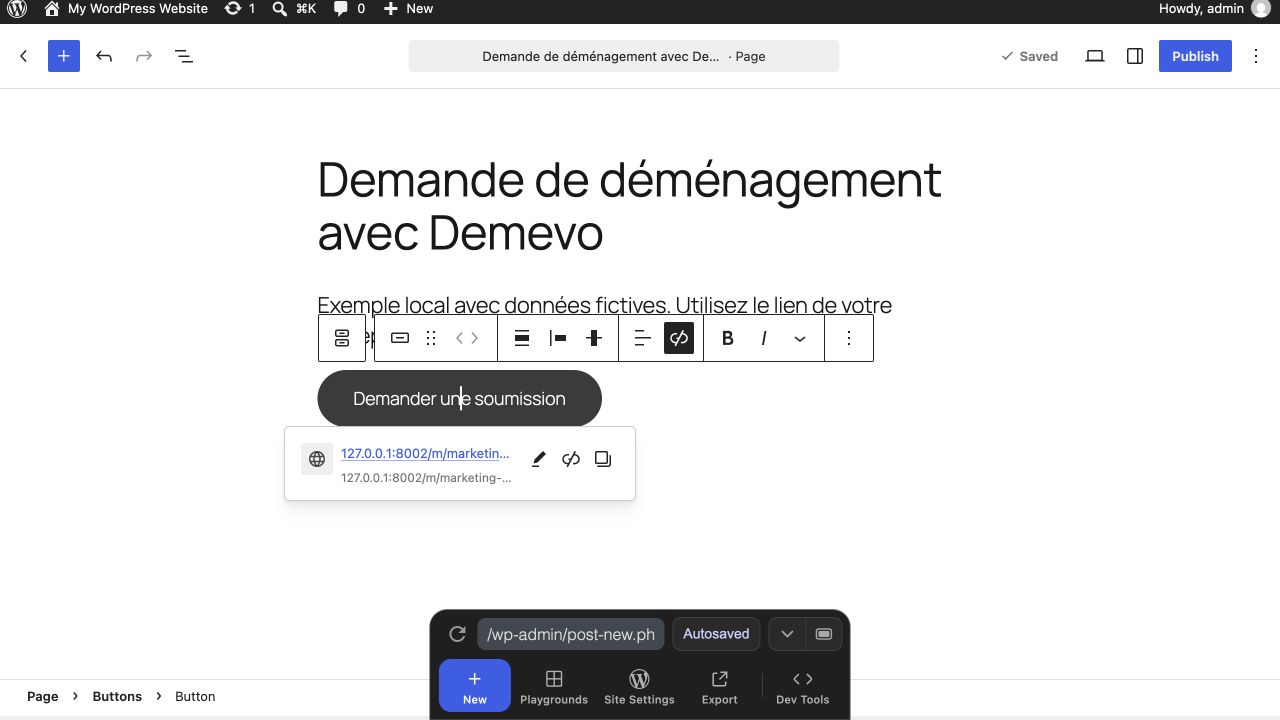
Or embed the form in your page
In Share and embed, register the website’s exact HTTPS origin, such as https://your-company.ca, then publish the configuration. Copy the iframe code in an enabled language. Website ownership verification is optional.
Add a Custom HTML block in WordPress, paste the code and save the page. Your WordPress account and hosting must allow iframes. If the code is removed or embedding is blocked, use the button linking to the hosted form.
An embedded-form example
This is an illustrative snippet, not a live customer form. Replace the example address with the published iframe code copied from your own workspace. Keep a descriptive title and enough height for the steps and error messages. Never paste a private owner URL.
<iframe
  src="https://demevo.example/m/your-company/en?embed=1"
  title="Request a moving estimate"
  style="width:100%;min-height:900px;border:0"
  loading="lazy">
</iframe>

<a href="https://demevo.example/m/your-company/en">
  Open the moving quote form
</a>
3. Check on a phone
Open the published page on a phone. Check the business identity, language, form width and scrolling. For an iframe, make sure the Continue button and messages remain reachable at every step.
4. Try a test request
Use test contact details to check that the request reaches the correct owner workspace. Review notices, terms and confirmation. In manual mode, no price is sent before your approval. Commercial enquiries remain contact requests.
Mistakes to avoid
Use your business public link, never the owner login. Publish changes to languages and allowed websites before testing. Automatic sending requires a complete request, applicable rules and a plan that supports it.
A test you can repeat after each website change
Test the public page as a visitor rather than relying on the WordPress editor preview. The hosted link is also a useful fallback when a browser, website policy or hosting plan blocks the iframe.
Sources and further reading
From the form to the quote
The form collects move details. Next, inspect the quote Demevo produces and compare plans based on your need for manual review or automatic sending.